The second your client pays. Your whole team gets paid.
The second your client pays. Your whole team gets paid.
Your client
pays once.
Your whole team gets paid.
Zplit lets you collect a single payment from your client and
automatically distribute it to collaborators, contractors, or partners.
Powered by Stripe Connect, built for small teams who share revenue.
Zplit lets you collect a single payment from
your client and automatically distribute it to
collaborators, contractors, or partners.
Powered by Stripe Connect, built for
small teams who share revenue.
Start now

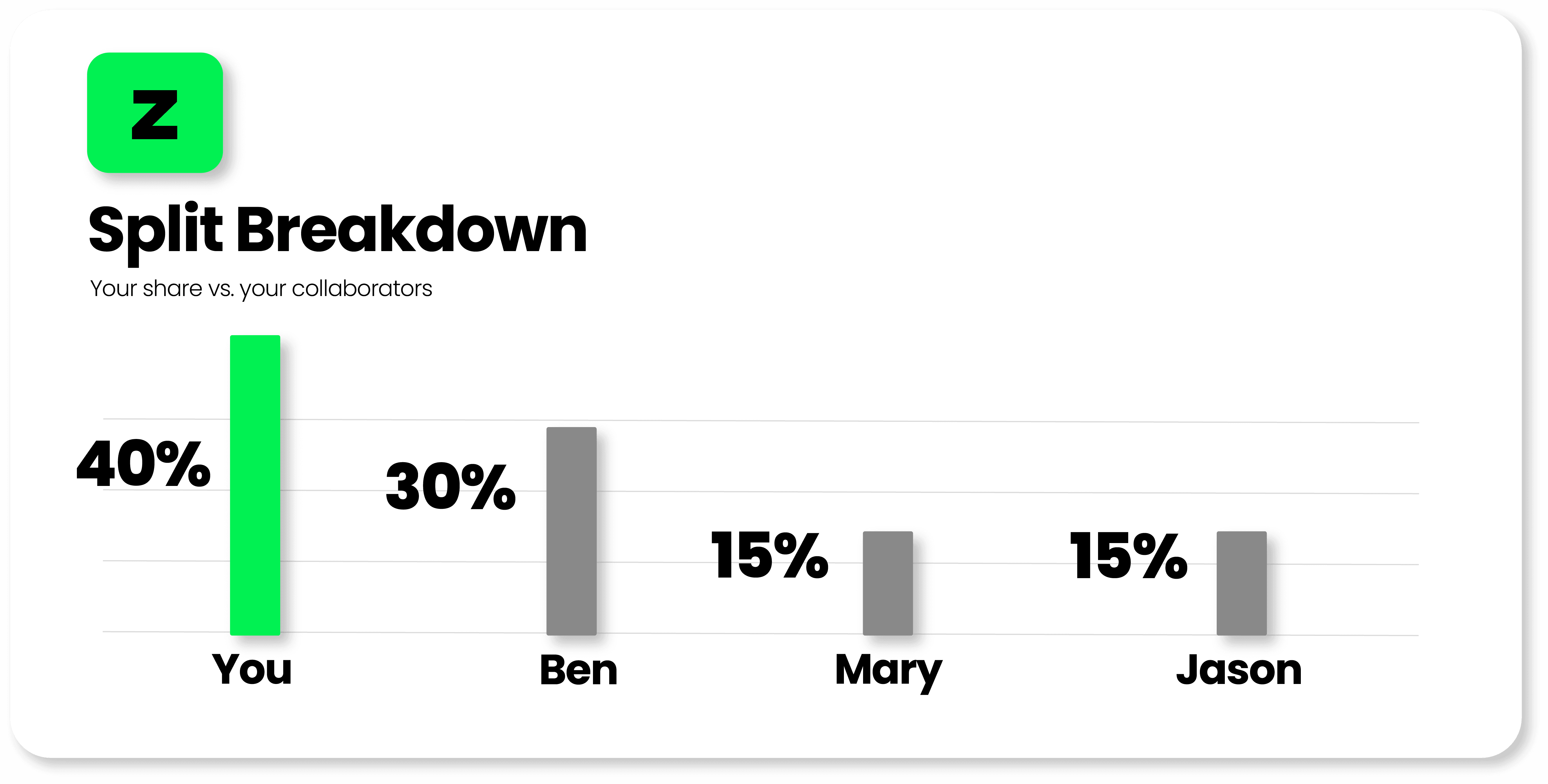

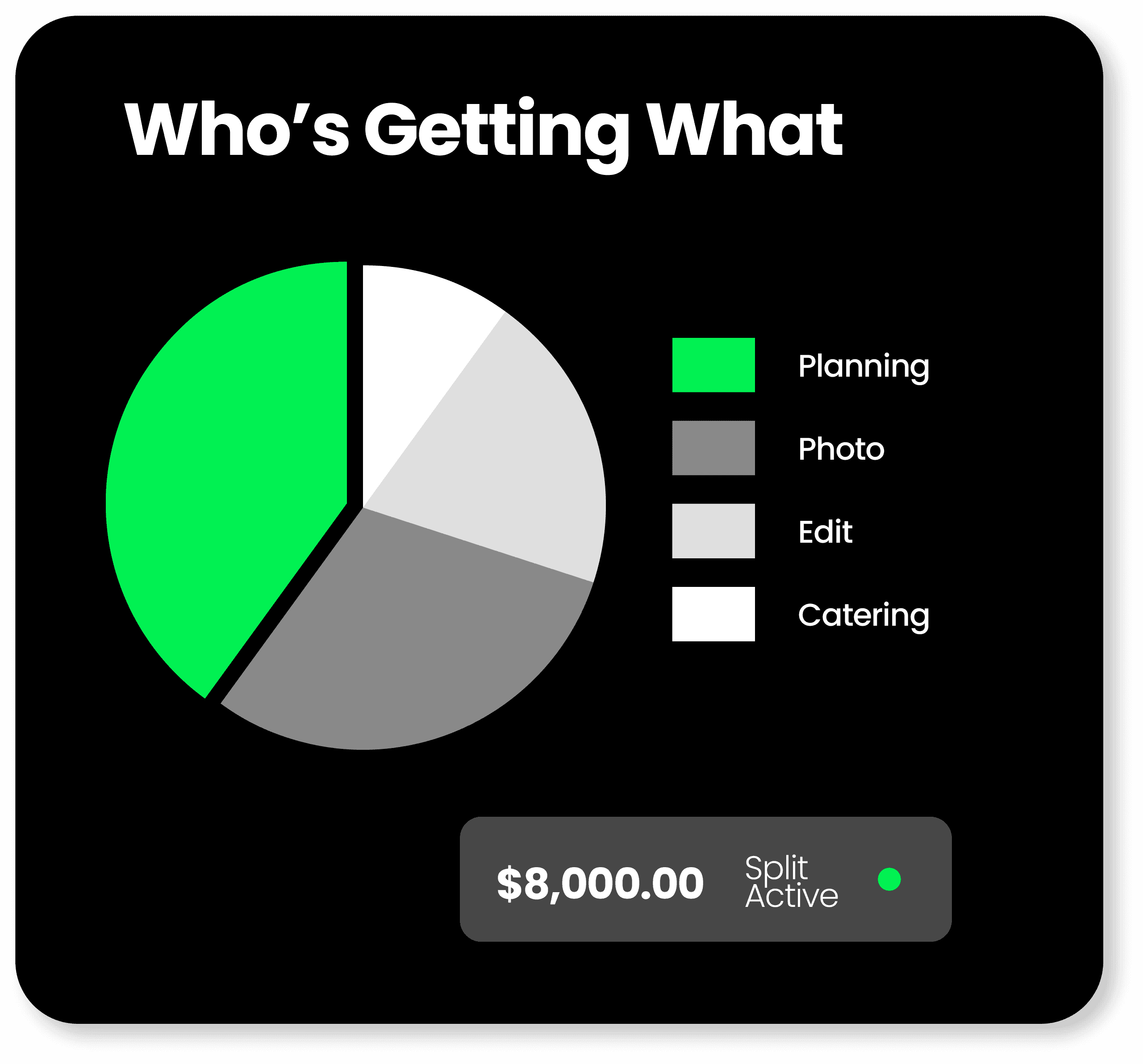
In private beta
In private beta
activating new teams every week.
activating new teams every week.
Designed for creative studios, agencies, and freelancers who collaborate on client work.
Designed for creative studios, agencies, and freelancers
who collaborate on client work.








Key Benefits
Why teams use Zplit instead of spreadsheets
Key Benefits
Why teams use Zplit instead of spreadsheets
One payment in,
many payouts out.
One payment in,
many payouts out.
Your client pays once. Zplit routes the money instantly to everyone according to the percentages you set.
Your client pays once. Zplit routes the money instantly to everyone according to the percentages you set.
Auto-calculated splits
Instant payouts
Percentage-based routing
No manual math
Team-wide transparency
Hands-off payment flow
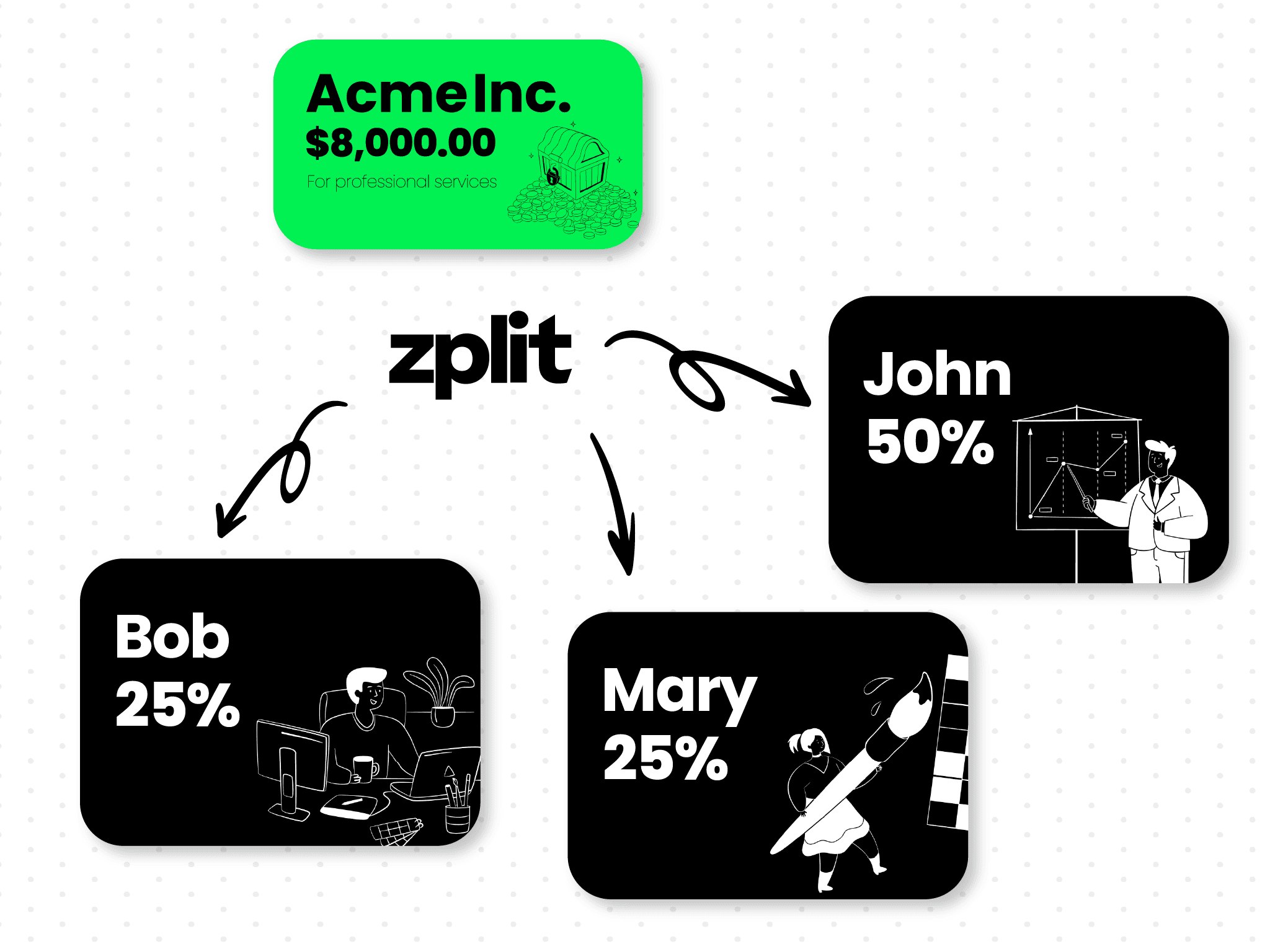
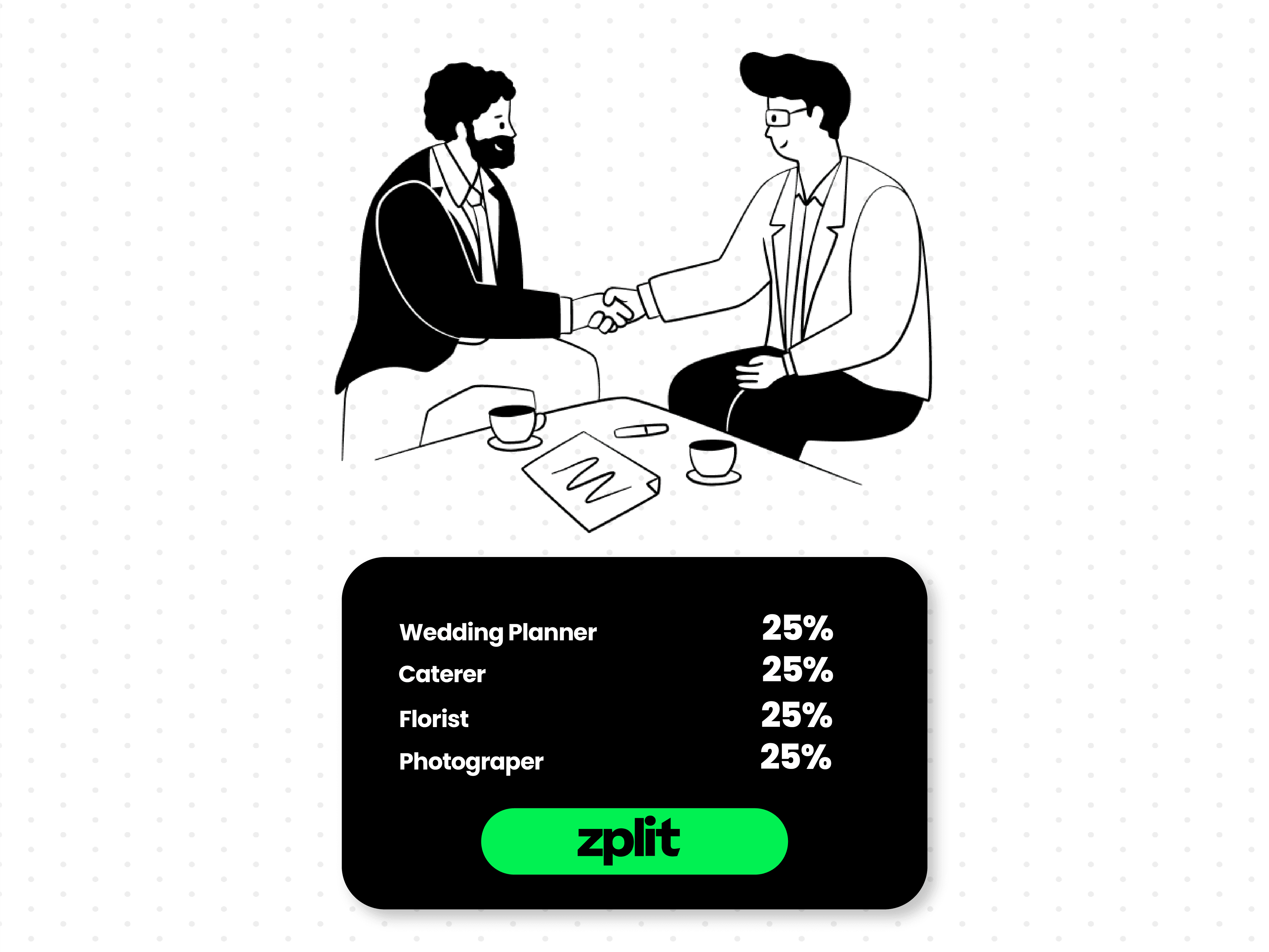
Less admin, fewer awkward conversations.
Less admin, fewer awkward conversations.
Agree on the split upfront, let Zplit handle the math and payouts. No more chasing people or calculating who gets what.
Agree on the split upfront, let Zplit handle the math and payouts. No more chasing people or calculating who gets what.
Upfront clarity
No more chasing payments
Friction-free payouts
Shared visibility
Admin reduced
Fair for everyone
Transparent and trackable.
Transparent and trackable.
See each split, status, and payout in a simple dashboard, so everyone stays on the same page.
See each split, status, and payout in a simple dashboard, so everyone stays on the same page.
Real-time status
Unified dashboard
Clear payout trails
Activity tracking
Easily monitor progress
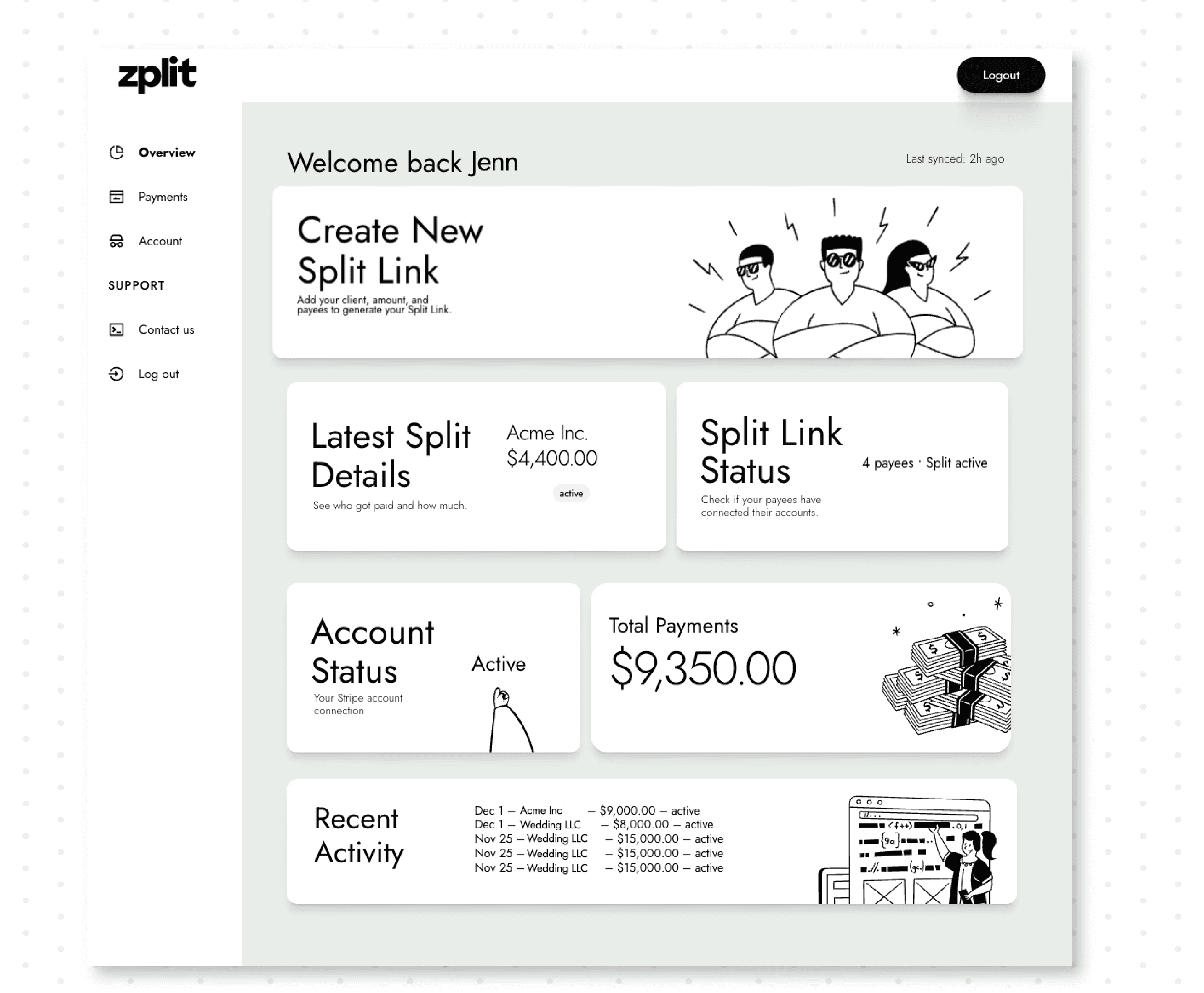
Process
How Zplit Works
Zplit works in 3 easy steps
Process
How Zplit Works
Zplit works in 3 easy steps
STEP 1
STEP 2
STEP 3
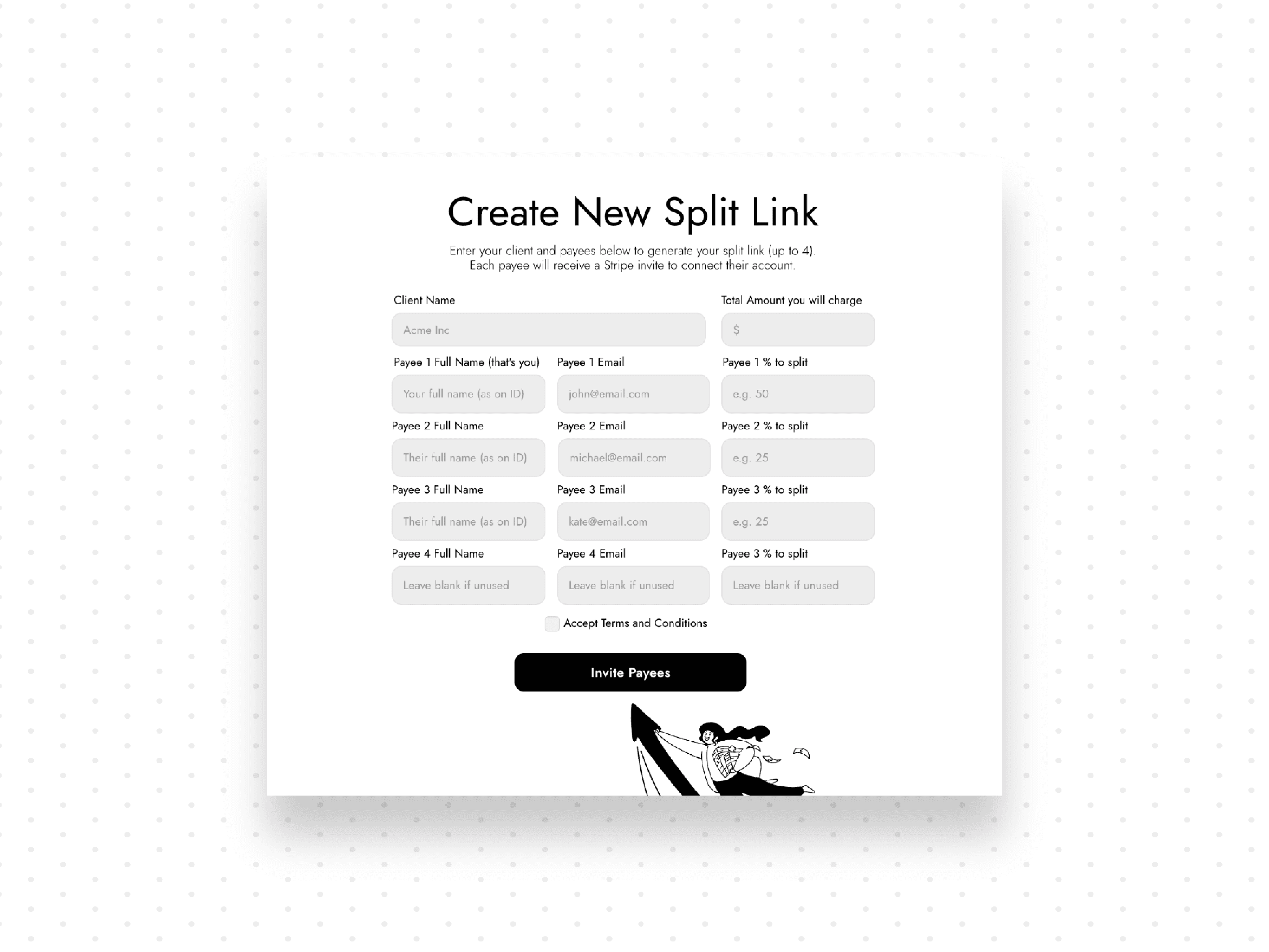
01. Create your split
Create your split
Set the total amount, add your client’s name, and list each collaborator with their percentage.
STEP 1
STEP 2
STEP 3
01. Create your split
Create your split
Set the total amount, add your client’s name, and list each collaborator with their percentage.
Start now
Built on Stripe. Secure by design.
Zplit uses Stripe Connect under the hood, so payments are processed with the same infrastructure trusted by millions of businesses.
Client card details never touch our servers. Funds move directly through Stripe from your client to each collaborator.
Stripe Connect for secure payment routing
Payouts go to each collaborator’s own Stripe account
Clear per-payment Zplit fee, plus standard Stripe fees (that can be passed to your client)
Built on Stripe. Secure by design.
Zplit uses Stripe Connect under the hood, so payments are processed with the same infrastructure trusted by millions of businesses.
Client card details never touch our servers. Funds move directly through Stripe from your client to each collaborator.
Stripe Connect for secure payment routing
Payouts go to each collaborator’s own
Stripe account
Clear per-payment Zplit fee, plus standard Stripe fees (that can be passed to your client)
%
Less Admin After Client Payment
Zplit automatically routes each collaborator’s share, removing the manual math, reminders, and bank transfers.
%
Less Admin After Client Payment
Zplit automatically routes each collaborator’s share, removing the manual math, reminders, and bank transfers.
%
90
Less Admin After Client Payment
Zplit automatically routes each collaborator’s share, removing the manual math, reminders, and bank transfers.
%
Automated Payouts
Once your client pays, Zplit handles the distribution instantly through Stripe Connect — no follow-ups or spreadsheets.
%
Automated Payouts
Once your client pays, Zplit handles the distribution instantly through Stripe Connect — no follow-ups or spreadsheets.
%
100
Automated Payouts
Once your client pays, Zplit handles the distribution instantly through Stripe Connect — no follow-ups or spreadsheets.
Card data stored
All sensitive payment details stay with Stripe. Zplit never touches or stores card numbers, ensuring maximum security.
Card data stored
All sensitive payment details stay with Stripe. Zplit never touches or stores card numbers, ensuring maximum security.
0
Card data stored
All sensitive payment details stay with Stripe. Zplit never touches or stores card numbers, ensuring maximum security.
WHO IS ZPLIT FOR
Designed for teams who share project revenue.
Zplit was created for those who share revenue and want payouts handled automatically, accurately, and without friction.
WHO IS ZPLIT FOR
Designed for teams who share project revenue.
Zplit was created for those who share revenue and want payouts handled automatically, accurately, and without friction.
Independent freelancers working with clients
If you’re a solo freelancer hiring assistants or specialists, Zplit automatically splits your client’s payment with everyone involved—no manual transfers needed.
Independent freelancers working with clients
If you’re a solo freelancer hiring assistants or specialists, Zplit automatically splits your client’s payment with everyone involved—no manual transfers needed.
Independent freelancers working with clients
If you’re a solo freelancer hiring assistants or specialists, Zplit automatically splits your client’s payment with everyone involved—no manual transfers needed.
Independent freelancers working with clients
If you’re a solo freelancer hiring assistants or specialists, Zplit automatically splits your client’s payment with everyone involved—no manual transfers needed.
Creative studios and agencies
Split payments between your core team and a rotating group of freelancers (editors, designers, producers) without rebuilding spreadsheets for every project.
Creative studios and agencies
Split payments between your core team and a rotating group of freelancers (editors, designers, producers) without rebuilding spreadsheets for every project.
Creative studios and agencies
Split payments between your core team and a rotating group of freelancers (editors, designers, producers) without rebuilding spreadsheets for every project.
Creative studios and agencies
Split payments between your core team and a rotating group of freelancers (editors, designers, producers) without rebuilding spreadsheets for every project.
Small businesses with revenue-sharing partners
If you split revenue among co-founders or partners, Zplit keeps payouts fair and consistent from a single client payment.
Small businesses with revenue-sharing partners
If you split revenue among co-founders or partners, Zplit keeps payouts fair and consistent from a single client payment.
Small businesses with revenue-sharing partners
If you split revenue among co-founders or partners, Zplit keeps payouts fair and consistent from a single client payment.
Small businesses with revenue-sharing partners
If you split revenue among co-founders or partners, Zplit keeps payouts fair and consistent from a single client payment.
Event and wedding professionals
Photographers, planners, florists, videographers, DJs—any team coordinating services for a single client can automate payouts and avoid awkward payment conversations.
Event and wedding professionals
Photographers, planners, florists, videographers, DJs—any team coordinating services for a single client can automate payouts and avoid awkward payment conversations.
Event and wedding professionals
Photographers, planners, florists, videographers, DJs—any team coordinating services for a single client can automate payouts and avoid awkward payment conversations.
Event and wedding professionals
Photographers, planners, florists, videographers, DJs—any team coordinating services for a single client can automate payouts and avoid awkward payment conversations.
Production teams (video, film, audio)
For crews with directors, editors, animators, sound engineers, or assistants, Zplit handles payout distribution so the entire production team is paid accurately and on time.
Production teams (video, film, audio)
For crews with directors, editors, animators, sound engineers, or assistants, Zplit handles payout distribution so the entire production team is paid accurately and on time.
Production teams (video, film, audio)
For crews with directors, editors, animators, sound engineers, or assistants, Zplit handles payout distribution so the entire production team is paid accurately and on time.
Production teams (video, film, audio)
For crews with directors, editors, animators, sound engineers, or assistants, Zplit handles payout distribution so the entire production team is paid accurately and on time.
Digital creators & musicians
For creators working with producers, editors, or featured collaborators, Zplit automatically distributes revenue from a single client payment—fair, fast, and transparent.
Digital creators & musicians
For creators working with producers, editors, or featured collaborators, Zplit automatically distributes revenue from a single client payment—fair, fast, and transparent.
Digital creators & musicians
For creators working with producers, editors, or featured collaborators, Zplit automatically distributes revenue from a single client payment—fair, fast, and transparent.
Digital creators & musicians
For creators working with producers, editors, or featured collaborators, Zplit automatically distributes revenue from a single client payment—fair, fast, and transparent.
Accurate Payouts
Seamless Collaboration
Less Admin Work
Fair Revenue Sharing
Reduced Bottlenecks
Why Zplit
Why teams prefer Zplit over manual payouts
Most teams still juggle screenshots, spreadsheets, and “did you send my part yet?” messages. Zplit turns all of that into one clear flow: a single client payment, a shared split everyone can see, and automatic payouts handled by Stripe.
Why Zplit
Why teams prefer Zplit over manual payouts
Most teams still juggle screenshots, spreadsheets, and “did you send my part yet?” messages. Zplit turns all of that into one clear flow: a single client payment, a shared split everyone can see, and automatic payouts handled by Stripe.

Built-in transparency
Everyone sees the agreed percentages and how much they’ll receive. No guesswork, no awkward follow-ups.
Protects relationships
Stop chasing late transfers or reminding people what they owe. Zplit makes the money part boring so you can keep the collaboration great.

Easy to ask for
Whether you’re the main contractor or a collaborator, you can simply say, “Let’s run this through Zplit so payouts are automatic and transparent for everyone.”
Frequently Asked Questions
You got questions? We got answers.
We’ve gathered all the important info right here. Explore our FAQs and find the answers you need.
Frequently Asked Questions
You got questions? We got answers.
We’ve gathered all the important info right here. Explore our FAQs and find the answers you need.
Can I start using Zplit now?
We’re rolling out Zplit in private beta and activating new teams every week. Click Join now to check your eligibility — if your work fits our current cohort, you’ll get immediate access.
How does Zplit handle my client’s payment?
Stripe processes the payment securely. Zplit simply applies the percentages you set and routes each share to the right collaborator.
What fees should I expect?
Zplit charges a simple 2% fee per successful client payment. Stripe’s standard processing fees also apply. You can choose whether these fees are absorbed by you or passed on to your client.
When are payouts sent to collaborators?
As soon as your client pays, Zplit tells Stripe how to divide the money between collaborators. Each collaborator’s share then follows Stripe’s normal payout schedule for their account (typically a few business days). We don’t charge extra for faster payouts.
Do collaborators need a Stripe account?
Yes — anyone receiving money connects or creates a Stripe account during onboarding. This keeps payouts compliant and secure.
How do I set the split percentages?
Just add your collaborators, assign any percentages you want, and Zplit ensures the total equals 100%. You can create unlimited combinations of splits.
Can I reuse a split link for multiple payments?
Each split link is tied to one specific payment. Once the client pays, you create a new link—your percentages can be reused with one click.
How can my clients pay?
Clients pay through Stripe using the payment methods you enable—credit/debit cards and, in many cases, bank or wallet options for larger amounts.
Which types of teams use Zplit?
Zplit is built for teams and collaborators who share project revenue like: – Solo freelancers who bring in outside help – Creative studios & agencies – Small businesses with revenue-sharing partners – Event & wedding pros – Production teams (video, film, audio) – Digital creators & musicians
Does Zplit hold my money?
No. Zplit never touches or stores your funds. All payments and payouts flow through Stripe.
Does Zplit store card details or process payments directly?
No. Zplit never handles or stores card information. All payments are processed securely through Stripe Checkout.
Is Zplit a wallet or money transfer service?
No. Zplit is not a wallet or money transmitter. We simply define each collaborator’s percentage and Stripe handles all movement of funds.
How does Zplit keep my data secure?
Your payment data is handled by Stripe. Zplit only stores the split configuration and collaborator info needed to trigger payouts.
Can I start using Zplit now?
We’re rolling out Zplit in private beta and activating new teams every week. Click Join now to check your eligibility — if your work fits our current cohort, you’ll get immediate access.
How does Zplit handle my client’s payment?
Stripe processes the payment securely. Zplit simply applies the percentages you set and routes each share to the right collaborator.
What fees should I expect?
Zplit charges a simple 2% fee per successful client payment. Stripe’s standard processing fees also apply. You can choose whether these fees are absorbed by you or passed on to your client.
When are payouts sent to collaborators?
As soon as your client pays, Zplit tells Stripe how to divide the money between collaborators. Each collaborator’s share then follows Stripe’s normal payout schedule for their account (typically a few business days). We don’t charge extra for faster payouts.
Do collaborators need a Stripe account?
Yes — anyone receiving money connects or creates a Stripe account during onboarding. This keeps payouts compliant and secure.
How do I set the split percentages?
Just add your collaborators, assign any percentages you want, and Zplit ensures the total equals 100%. You can create unlimited combinations of splits.
Can I reuse a split link for multiple payments?
Each split link is tied to one specific payment. Once the client pays, you create a new link—your percentages can be reused with one click.
How can my clients pay?
Clients pay through Stripe using the payment methods you enable—credit/debit cards and, in many cases, bank or wallet options for larger amounts.
Which types of teams use Zplit?
Zplit is built for teams and collaborators who share project revenue like: – Solo freelancers who bring in outside help – Creative studios & agencies – Small businesses with revenue-sharing partners – Event & wedding pros – Production teams (video, film, audio) – Digital creators & musicians
Does Zplit hold my money?
No. Zplit never touches or stores your funds. All payments and payouts flow through Stripe.
Does Zplit store card details or process payments directly?
No. Zplit never handles or stores card information. All payments are processed securely through Stripe Checkout.
Is Zplit a wallet or money transfer service?
No. Zplit is not a wallet or money transmitter. We simply define each collaborator’s percentage and Stripe handles all movement of funds.
How does Zplit keep my data secure?
Your payment data is handled by Stripe. Zplit only stores the split configuration and collaborator info needed to trigger payouts.
Pricing
Simple, transparent pricing.
Pricing
Simple, transparent pricing.
Just 2% per client payment. That’s it.
That’s the only fee Zplit charges. No subscriptions. No hidden costs. No contracts.
Just 2% per
client payment.
That’s it.
That’s the only fee Zplit charges. No subscriptions. No hidden costs. No contracts.
Stripe processes your client’s payment and charges its own standard processing fee.
Many teams either absorb these costs or build them into their project price.
Stripe processes your client’s payment and charges its own standard processing fee.
Many teams either absorb these costs or build them into their project price.
Pricing